


The Benefits of Integrating LMS, LCMS, DMS, and LXP into One System
CEO, Kontis s.r.o.
8 minutes read


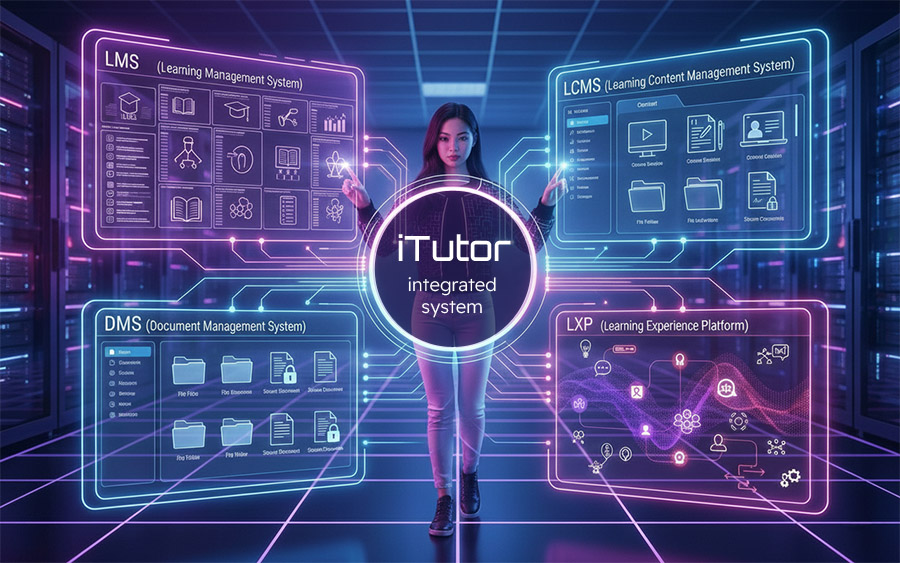
Summary: There are numerous systems referred to by one or more of the acronyms LMS, LCMS, DMS, or LXP. We will briefly explain what these acronyms stand for and discuss in more detail the advantages of a solution offering the functionality of all these acronyms in a single platform.
Brief Explanation of Acronyms
DMS
Of all the acronyms listed, DMS is the most widely known to the general public. It stands for Document Management System. This term refers to systems that ensure the central storage of documents in a single data warehouse, supporting:
- approval processes for inserting, changing, and deleting documents
- document versioning
- access to documents with detailed rights management
- document search based on content or descriptive metadata
More about DMS, for example, at https://en.wikipedia.org/wiki/Document_management_system
LMS
LMS stands for Learning Management System. This term refers to systems for managing corporate or any other type of training. They ensure student management, e-course management, and potentially classroom training management, managing instruction by assigning courses to students, tracking study results, reporting, and a range of related training functions.
LXP
LXP stands for Learning Experience Platform. This term refers to learning platforms similar in functionality to an LMS, but unlike the classic, centrally managed training administration operated in an LMS, they emphasize personalized learning. They support individual student needs, student-driven learning, peer-to-peer learning, and active student engagement in both learning and creating educational content.
LCMS
LCMS stands for Learning Content Management System. This term refers to systems for creating educational content in the form of e-learning courses. These are not merely authoring tools but address the team-based process of creating and modifying e-courses, from didactic processing and creation to content distribution and sharing.
Benefits of a Platform Combining LMS, LCMS, DMS, and LXP Functionalities
To avoid describing only abstract, general benefits, individual advantages will be presented here using specific examples from the iTutor platform, which combines all functionalities of an LMS, LCMS, DMS, and LXP in a single solution.
E-courses into LMS/LXP
E-learning courses explain subject matter interactively and using multimedia. Special tools are usually used for developing e-courses:
- Classic development tools: imagine these simply as a more advanced PowerPoint. When using them, e-course developers must:
- maintain source data for courses in some storage, usually on their local drives, shared company drives, etc. Sources need to be maintained not only during the initial course development but for any future updates. This is administratively demanding.
- after creating an e-course, and with every subsequent update from stored updated sources, the course must be exported from the development tool as a package meeting some e-learning standard, e.g., SCORM or AICC. The LMS or LXP administrator must then import the package into the solution. Again, it is administratively demanding to keep sources and courses current in the LMS or LXP, where they are duplicated.
- Development tools of the LCMS class simplify the administration described above:
- management of courses and their source data is eliminated. Courses and their sources are stored in the so-called LCMS Repository, which is a central warehouse of sources and learning objects (SCO - Shareable Content Objects) created from them. Developers with appropriate permissions can access them at any time, update them, and export results in the form of standardized packages without worrying about where the sources or SCOs are stored.
- administration of transferring exported e-course packages from LCMS to LMS or LXP remains, during which packages need to be passed through a shared space between solutions using exports/imports. Similar to the case of a classic development tool, the course exists in 2 places: in the LCMS development environment and in the LMS or LXP. It is necessary to administratively ensure that the LMS or LXP always has the current version of the course from the LCMS.
If the LCMS is integrated with the LMS/LXP in one platform, the administration of sources, courses, and course transfers between systems described above is eliminated.
In the iTutor platform, courses are developed in the iTutor Publisher LCMS environment; course sources and the resulting learning objects (SCOs) are maintained in its Repository. iTutor Publisher facilitates searching for sources and SCOs over the Repository, ensures their WYSIWYG editing, versioning, and assembly into resulting courses; Publisher manages developer rights for these activities. The administration of transferring the course to the LMS/LXP described above can thus be done with a few clicks:
- when a developer is finished with the first version of a course in LCMS iTutor, they simply link it to a specific course in LMS/LXP iTutor. In the LCMS, they invoke a dialog that displays the tree structure of all courses in LMS/LXP iTutor divided into categories. In the dialog, either an existing course is selected (and the course being developed in LCMS is added to the selected course in LMS/LXP), or a course category is selected (adding the course being developed in LCMS as a new course in that category in LMS/LXP).
- iTutor LMS/LXP then presents the course content to students from the SCOs stored in the LCMS Repository; the course is not duplicated.
- if a new version of the course needs to be prepared, a link is available in the LMS/LXP next to the course showing where it is stored in the LCMS. Using this link, one can easily navigate to all current course sources stored in one place and their SCOs; a developer with appropriate permissions can start WYSIWYG editing them.
- iTutor LMS/LXP presents the previous version of the course to students during such modifications until the developer of the new version invokes the course update action in the LCMS. This action tells the LMS/LXP to present the new version of the course, which is ready. The developer invokes the action with a single click over the developed course in the LCMS; they no longer have to specify which course in the LMS/LXP needs updating, as the LCMS "knows" this from the initial link to the course in the LMS/LXP. If the updated course contains updated SCOs, e.g., some course pages shared in other courses (which iTutor LCMS also supports), all affected courses in the LMS/LXP are automatically updated.
Documents into LMS/LXP
Creating quality interactive and multimedia e-learning courses places high didactic and technical demands on creators. Their production usually has long and costly cycles; developing an e-course makes sense in cases where:
- its content does not change often over time
- the subject matter requires a high degree of interactivity and multimedia for understanding
- a sufficient number of participants will pass through the created e-course so that production costs are returned through savings and advantages of e-courses compared to classroom training.
In companies and institutions, there are usually many training materials in files of various formats, such as PDF, MS Word, PowerPoint, Excel, image, audio, or video files. Reading, listening to, or watching such materials is sufficient for understanding the content in many cases, so there is no need to expensively produce e-courses from them. Sometimes just reading/watching/listening to the file is enough; other times it is supplemented by testing the acquired knowledge contained therein using e-tests (which many LMS/LXP solutions can produce automatically) or by student confirmation of reading/viewing and potential issuance of signed certificates, which quality LMS/LXPs again support. The named files are usually stored in the company/institution:
- in a number of places such as shared disk spaces, local drives, and other types of storage. Administration of documents stored this way is demanding; inserting them into an LMS or LXP brings the previously described problem of duplicate document storage in the LMS or LXP and the original repository, along with associated problems regarding their search retrieval, updating, and re-transfer to the LMS or LXP.
- in a central DMS, where document administration is significantly easier. If the used DMS allows access to documents stored in it via links, and these links can be used in the LMS or LXP within courses, the problem of duplicate documents in the DMS and LMS or LXP is eliminated. In the case of creating a new document version in the DMS, the LMS or LXP is usually capable of automatically presenting this new version of the training material to students because the link from the course to the DMS usually shows (depending on the specific DMS) the current version of the document without needing to change the link listed in the course.
If the DMS and LMS or LXP are integrated into one platform, it brings other significant advantages in the area of familiarizing students with updated content in the DMS that is connected in the LMS or LXP to its courses, which we will show here.
The iTutor platform has an integrated DMS called iTutor Documents, solving all usual DMS functions such as approval, versioning, rights management, and document search. Documents managed in iTutor Documents can be connected to courses in iTutor LMS/LXP without the user having to copy the link to the document in the DMS to the course in the LMS/LXP. The connection is made simply by linking the document and the course in a dialog invoked either in the DMS or in the LMS/LXP; both systems "know each other." A major advantage of integration is that the LMS/LXP can then more comprehensively interpret version changes of documents in the DMS connected to its courses in this way. When a new version of a document is issued in iTutor Documents, the iTutor LMS/LXP automatically terminates the validity of its corresponding connected course for this document based on the extent of the change. This forces students to study the course with the updated document again, potentially with a new test completion or confirmation of reading the updated document version. If such a course is used to fulfill qualifications, the corresponding qualifications are also cancelled, and the user must renew them by studying the course again. For example, at Continental, they have production documentation stored in iTutor this way, which is linked via courses in LMS iTutor to corresponding qualifications. Based on the fulfillment of these qualifications, employees are allowed onto production lines using employee card readers. By swiping a card at a specific place on the production line, the employee's current qualifications for work at that place are checked. When production documentation for a given place on the line changes, iTutor automatically ensures that only those employees who have familiarized themselves with the updated documentation for that place are admitted to that specific production line and its location. Thanks to the integration of the advanced iTutor LMS with qualification support iTutor Qualifications and DMS iTutor, such functionality was achieved without the need for custom integration of various systems for document management, course study, and qualification management. More in the case study here.
E-courses into DMS
As already mentioned, e-learning courses developed using development tools explain subject matter interactively and with multimedia. This has a great advantage for students; such an e-course helps them understand the subject faster and easier and increases retention rates compared to merely reading the corresponding document. It also brings one disadvantage: in such e-learning courses developed in a special tool, it is difficult to search for something textually. Their content is usually "wrapped" in various instructional strategies, and their format is not easily accessible to classic text search. The course is located, for example, in a series of HTML pages where texts are additionally "hidden" in various JS functionalities bringing the required interactivity to the student. Or the entire course is in a format specific to a particular development tool, which is completely inaccessible to a text search engine from the outside. In an LMS/LXP, one can usually only search over such courses by searching their descriptions, titles, or keywords.
Most quality DMSs have robust tools for full-text search in all documents they manage. They can perform advanced text searches in files of many formats if they contain text in some form inside. If you use an LMS/LXP with simple e-courses whose content is represented by files in an integrated DMS, as described above in the paragraph Documents into LMS/LXP, you automatically have solved advanced searching in such simple e-courses.
If you also have an integrated LCMS in the platform, complex integration can solve searching even in interactive and multimedia e-learning courses. The solution to this problem can again be illustrated on the iTutor platform with integrated LCMS iTutor Publisher, where advanced e-courses can be developed and linked with courses in iTutor LMS/LXP, as described in the paragraph E-courses into LMS/LXP. iTutor Publisher can additionally create PDF images from these e-courses and automatically transfer them to iTutor Documents, which is the integrated DMS in the platform. When converting an interactive multimedia e-course, iTutor Publisher automatically converts all interactive course elements into a text form clearly readable in PDF. For example, for a "progressive disclosure" element, it displays all texts that are initially hidden in the course and the user must "click through" to display them, thus making them accessible to the search engine. iTutor Publisher saves the resulting PDF in the DMS automatically and links it to its source course. Users can thus find the content of these interactive e-courses via full-text search in the DMS. When they click on the found document in the DMS, they have available not only the PDF image of the course but can also launch the e-course directly by clicking the link to iTutor LMS/LXP. As a side effect of this functionality, the iTutor platform can create printable materials in PDF form from interactive and multimedia courses developed in its LCMS.
LMS with LXP
As is clear from the definitions in the introduction to the article:
- LMS focuses on central training administration, usually performed in a company by the HR department. Training in an LMS is realized as a process where it is defined who needs to know what, e.g., using qualification or competency matrices, and the LMS ensures the necessary completion of specific courses by specific employees at the right time, e.g., when an employee arrives at a specific job position or department, or when a course expires. This is often used for training in regulations, directives, rules, and employee certifications.
- LXP focuses on a personalized and user-driven learning process, allowing every employee to manage their learning path and study at the moment of need. An LXP recommends courses based on the employee's interests, role, and activity, allows the employee to participate in creating course content, and learn through collaboration. This is often used, for example, in partner or customer training, where such things cannot be mandated and controlled but must be engaged in training using LXP incentive tools.
It is clear from this that you will most likely need a solution meeting both requirements, which is an integrated LMS and LXP in one platform. In your company or institution, you will usually need both approaches to achieve your goals in HR management and training. The iTutor platform integrates LMS and LXP functions; this issue is discussed in more detail in the article here: LMS or LXP.
AI Rules Them All
The integration of all LMS, LCMS, DMS, and LXP systems in one platform takes on new meaning with the arrival of AI. AI in this area is used for many functionalities, e.g., for creating e-learning content, creating just-in-time and micro-learning from existing e-courses, creating virtual assistants supporting both the learning process and company processes based on this training, automating assessment, or analyzing student learning results and associated adaptive learning. AI can also process not only text materials but also image, audio, or video, which brings another dimension ranging from searching for e-courses to processing queries or tasks over them in natural language, etc.
From this, the advantages of integrating LMS, LCMS, DMS, and LXP in one platform are already clear. If the platform also possesses AI functionalities, students, course developers, and training administrators can achieve much better results over unified platform data than over data in separate systems. The iTutor platform is one of the few that not only uniquely combines all named functionalities of LMS, LCMS, DMS, and LXP but also offers the powerful iTutor AI module over these systems. Using RAG (Retrieval-Augmented Generation) technology, which improves large language models (LLM) by allowing them to retrieve relevant information from a range of sources before generating an answer, it can deliver a range of the most advanced AI functionalities currently used in education and HR management to users. You can read more about this in the article Use of AI in E-learning.