


Learning
Create and distribute courses, track employee progress, manage your budgets
Management System
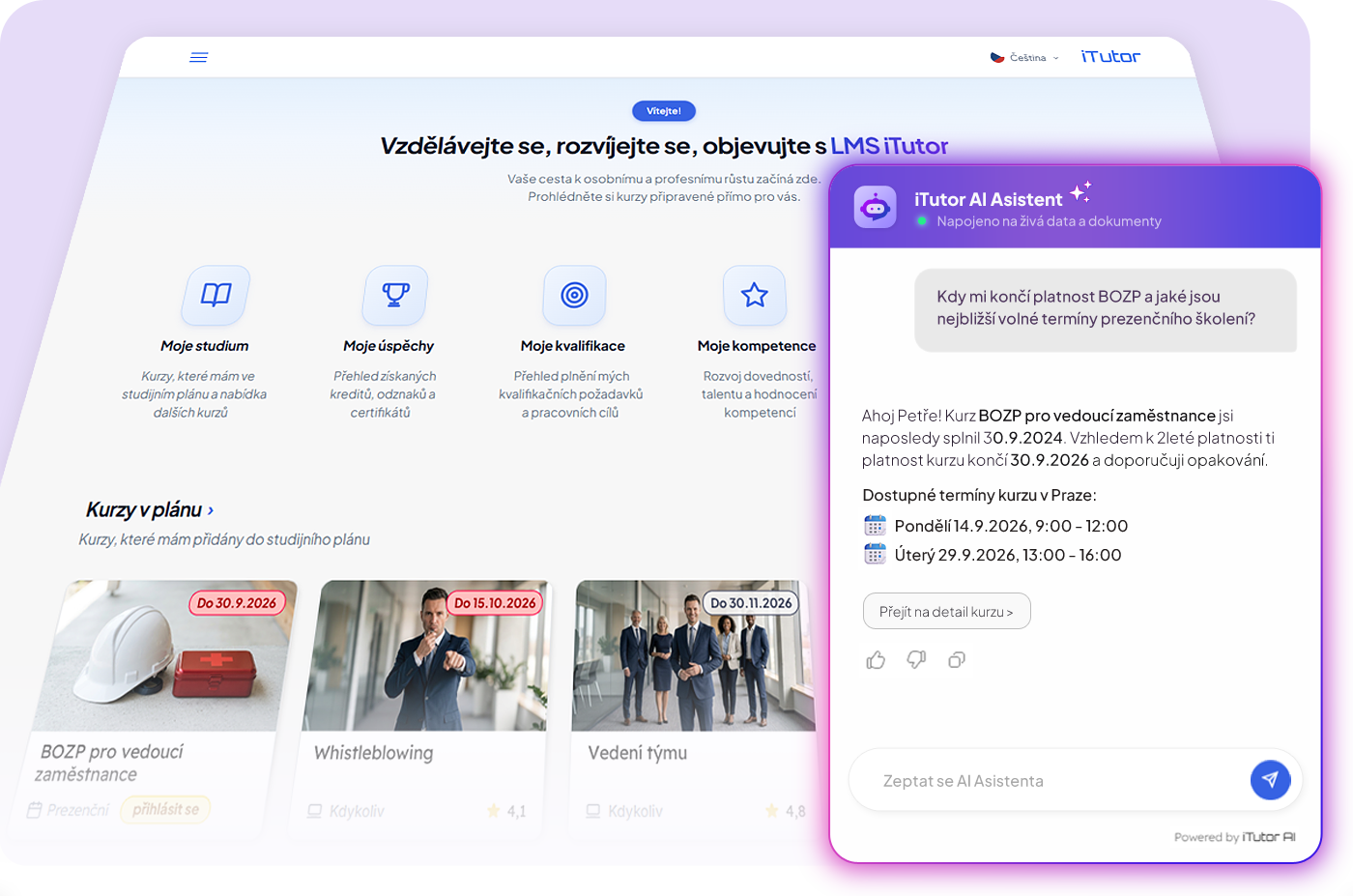
iTutor LMS is a powerful learning management system implementing the latest trends in e-learning, traditional classroom training, and blended learning.
For users, iTutor LMS delivers interactive, contextual, proactive learning and professional growth; for managers and HR professionals, it brings efficient learning management and full automation of administrative tasks.
By adding the other advanced modules described here, you gain one of the most advanced comprehensive human resource management platforms, powered by AI.
One of the key administrative applications of iTutor LMS is the Organization Management application, which manages, among other things, all users in the system and their organizational structures. The iTutor LMS module, together with the iTutor Messenger and iTutor Reporter modules, forms the core of the iTutor platform; without these modules, the iTutor platform cannot operate.
Users
iTutor enables central management of all users registered in the system. Each managed user has a range of properties, among the basic ones are:
- User identification data such as First Name, Last Name, Titles, National Identification Number, Employee Number.
- User login credentials consisting of a unique user identification within iTutor and their password.
- User's native language. Based on their native language, iTutor displays system-managed objects that support multilinguality, such as courses or documents, in the language mutation corresponding to the user's native language. If such a language version does not exist, the system can locate a language version as close as possible to the user's native language.
- Additional user details such as Date and Place of Birth, various Addresses (Correspondence, Home, Work), communication channels (emails, various Phone numbers), and User Notes.
- Bridge transfer flag: Whether the user was imported via a bridge from an external system, and if so, what Unique Identifier is used for pairing with the user in the external system.
- Import permission: Whether this user is allowed to be manipulated (modified, deleted, assigned to groups) via manual import, and if so, what Unique Identifier is used for pairing with the import file.
- Custom user properties: Ability to define custom attributes (e.g., employee badge numbers, positions, etc.), with configurable settings for where these properties draw or inherit their initial values and whether they can be modified.
Administrator-permitted properties can be modified by users directly in their profile, while users can designate individual attributes as private (hidden from colleagues) or public (visible to colleagues).
iTutor features integrated user password management with password complexity rules and password expiration. It supports manual login using User Login Credentials with optional 2FA (which can be enabled selectively for specific User Groups), or Single Sign-On (SSO) supporting Microsoft Entra ID, AD FS, Okta, SAML 2.0, and WS-Federation. A hybrid login mode (SSO / manual login) can also be enabled.
iTutor includes the iTutor Deleted module, managing users who have been removed (deleted) from the system or have left the organization. Using this module ensures legal compliance when demonstrating statutory training history for former employees, while preserving statistical accuracy regarding attendance at completed educational events.
User Groups
A User Group is the fundamental building block in iTutor for bulk user management. User groups enable bulk assignment of learning, tracking and analyzing study progress and results; with additional modules of the iTutor platform, any other system objects such as Qualifications, Competencies, Medical Fitness, or Goals can be similarly assigned in bulk. Each User Group possesses a range of properties, among the basic ones are:
- Group Name and supplementary details such as Description, contact, and communication channels.
- Maximum capacity of users in the group (can be set to unlimited).
- List of Group Managers: User references designating managers for this group. When using the iTutor Catalog module, each manager's approval level can be configured for course enrollments, nominations, subgroup users, and self-approval permissions. Different approval rules can be set for different course categories.
- Onboarding training: Structured training plans can be established on groups with onboarding enabled.
- Two-Factor Authentication (2FA) policy: Specifies how group members log in manually to iTutor. You can apply global system settings, disable manual login entirely (forcing SSO only), or require 2FA manual authentication via email, authenticator app, or both.
- Managerial assignment: When enabled, group managers can add or remove their subordinates to/from subgroups.
- Self-enrollment: When enabled, users can enroll themselves into subgroups, with configurable rules on eligibility, single-subgroup exclusivity (auto-removal from previous subgroup), and mandatory subgroup selection upon login.
- Bridge transfer flag and manual import permissions and identifiers for external system synchronization.
- Automatic group population: Groups can be populated automatically based on logical criteria (e.g., membership in another group, managerial role, specific user attributes) combined with AND/OR operators. The group dynamically updates as users meet or cease to meet these conditions.
Any system user can be added to any User Group in iTutor. A single user can exist in an unlimited number of User Groups via linking, remaining a single unique user entity shared across groups.
In iTutor, an unlimited number of parallel hierarchical structures can be created from User Groups, modeling departmental organization, manager-subordinate relationships, job positions, workplaces, cost centers, and anything else required for company administration, training analytics, course assignment, access rights, and communication. With additional iTutor modules, these structures are utilized to manage qualifications, competencies, goals, or budgets. Linking users and groups allows sharing entities across different corporate views.
iTutor provides summary and detailed overviews for each User Group and individual user regarding assigned training and its completion. With additional platform modules, these overviews automatically expand to include module-specific areas—e.g., iTutor Competencies adds competency assignments and assessments, while iTutor Qualifications adds qualification fulfillment tracking.
Imports and Bridges
iTutor supports manual imports of Users and their updates from TXT, CSV, XLSX, or XML data sources.
iTutor supports manual imports of User Groups, their relationships, and user group memberships from TXT, CSV, XLSX, or XML sources.
Imports of Users and Groups can serve not only for initial system population, but also for regular synchronization of changes from a source ERP or HRM system. Objects in import files are paired with matching iTutor objects using a Unique Identifier. The import operates in two modes via the RECORD_ACTION field:
- State import (RECORD_ACTION = STATE): iTutor transforms the state described in the import file into the system state. Non-existent objects are created, existing ones are updated, and omitted objects are deleted. This mode eliminates discrepancies between iTutor and the source system.
- Delta import (RECORD_ACTION = NEW / EDIT / NEW_OR_EDIT / DELETE): iTutor performs the specified action per row, applying incremental changes since the last export.
Thanks to the ability of User and Group imports to regularly mirror external systems, iTutor can be deployed and populated rapidly, allowing employees to start training immediately (e.g., with ready-made compliance e-courses). In the SaaS model, iTutor can be launched virtually immediately after the implementation decision. In the on-premise model, after standard server installation (typically completed within a single day), iTutor is ready for core education. Further implementation steps—system integrations (SSO, ERP bridges), corporate branding redesign, custom e-course development, company know-how onboarding, and bespoke customizations—can be rolled out gradually while iTutor is already in active operation.
iTutor features integrated bridges for automated two-way synchronization of users, groups, relationships, and memberships with Active Directory and leading ERP/HRM systems such as SAP HR, EGJE/Elanor, ENTRY/HJ-SOFT, Helios/Asseco Solutions, Human/HOUR, KS Program/KS, OKbase/OKsystem, and RON Software.
Deploying a specific connector is fast thanks to iTutor's built-in bridges: a pre-built connector for the target external system is tailored to the customer's specific ERP/HRM setup. Furthermore, iTutor includes a universal bidirectional integration core from which all connectors are derived. Connecting to a previously unsupported external system requires only mapping inputs and outputs to this universal core, allowing new integrations to be delivered within a few weeks.
Courses
A Course in iTutor LMS is the fundamental educational unit, representing a training event, course, or comprehensive piece of instructional knowledge delivered to students. Courses consist of learning units called lessons—the indivisible learning blocks fulfilling specific instructional goals. In larger courses, lessons can be structured into hierarchical lesson blocks. This rich structure of diverse lesson types can model any synchronous or asynchronous educational activity: fully electronic, traditional in-person classroom, or combined blended learning.
Students complete (study, pass) courses by finishing their lessons. Completing all mandatory lessons marks the course as passed, becoming valid from the completion date of the last mandatory lesson. A valid course represents the attainment of qualification or successful completion of a training event; iTutor LMS automatically generates and records certificates upon completion.
A Course possesses a range of properties, among the basic ones are:
- Course Title and descriptive metadata: Description, Duration, Target Audience, Keywords, Thumbnail Image, and acquired Knowledge/Skills (which can be categorized). Supplementary descriptive attachments can also be added.
- Course Language: Multilingual courses are supported; if multiple language versions exist, the system presents the mutation corresponding to the student's native language or the closest match.
- Course Periodicity — Periodic vs. Non-Periodic:
- Periodic courses have limited validity that expires automatically after a defined period following completion, requiring the student to re-take the course to renew validity. Expiration periods can be defined in multiple ways.
- Non-periodic courses remain valid indefinitely once completed.
Administrators can force the expiration of both Periodic and Non-Periodic courses at any time, e.g., when course content changes significantly.
- List of Course Instructors: System user references designating course lecturers. With iTutor Catalog, approval workflows can specify whether instructors approve student enrollments and self-approvals.
- Delivery Method — In-Person vs. Self-Study:
- In-person courses represent synchronous learning held at a defined time where instructors teach and interact with students. In traditional training, this includes classroom sessions (bound to location and time, represented by Classroom lessons). In e-learning, this includes video conferences and virtual classrooms (bound to time, represented by Webinar lessons). In-person courses are organized into Sessions (Terms) defining schedules and venues, with enrollment and capacity management. Asynchronous lessons can be incorporated to create blended learning.
- Self-study courses represent asynchronous learning, represented by Self-Study, Test, or Assignment lessons. Students learn at their own convenience and pace. Users enroll directly in these courses or are assigned by administrators or managers.
- Budgeting flag: Used with iTutor Budgets to determine whether session and course costs (e.g., license purchases) are allocated against cost centers and visible in approval workflows, including Cost Categories.
- Direct course links: Shareable URLs (e.g., via email) allowing users to jump directly to course details, launch assigned courses, or register for available sessions.
- List of Course Sessions: Applicable to synchronous in-person courses.
- Course Certificate: Specifies if a certificate is issued and its template. When using iTutor eSignature, the system ensures electronic signatures on issued certificates.
- Final Completion Report: Configurable report generated and displayed to students upon course completion via iTutor Reporter.
- Prerequisites: Starting a course can be conditioned on completing or not completing other specified courses, combined with boolean AND/OR operators.
- Higher-level course dependencies: Advanced dependency chains where higher-level courses require completing lower-level courses after a defined waiting period, with renewal cascades.
- Course Evaluation: Star ratings by students immediately post-course, and delayed ratings by managers assessing the practical impact of the training on job performance.
- Course Provider: Selected from a supplier catalog with detailed vendor profiles.
- Indicative Price and currency for approval and budget workflows, including regional currency conversion.
- Course Credits: Utilized in motivational features and gamification.
- Acquired Skills/Knowledge: Automatically granted upon course completion, or selectively awarded by instructors during classroom attendance logging.
Sessions
Course Sessions apply exclusively to In-Person Courses, defining the time frame and location for completion. Key properties include:
- Start and End Dates with automated reminder notifications before the session begins and post-session evaluation alerts for attendees and instructors.
- Registration Deadlines: Cut-off dates for submitting applications with automated notifications.
- Session clarification notes and detailed descriptions.
- Session Region and Venue Address, including map and web links for classroom training.
- Waitlisting permissions and alternate participant limits when capacity is filled.
- Session Pricing and currency (per session or per attendee), integrated with iTutor Catalog and iTutor Budgets.
- Session Status: Active (open for registration and approvals) or Closed (auto-closed upon reaching the registration deadline).
- Organization status tracking via iTutor Catalog.
- Session Provider and assigned instructors.
- Detailed scheduling of synchronous lessons (classroom and webinar intervals, multi-day blocks, attendee capacity per run, instructor calendars, and training resource bookings such as computers and projectors).
- Scheduling of asynchronous lessons within blended learning.
Lessons
A Lesson is an indivisible instructional unit through which students complete a course (with SCORM multi-SCO units providing sub-lesson analytics). Lessons exist within courses and can be shared (linked) across multiple courses; completing a shared lesson completes it across all linked courses.
Asynchronous electronic lessons (Self-Study, Test, Assignment) are completed by users meeting defined completion criteria. Synchronous lessons (Classroom, Webinar) are completed either automatically upon scheduled session conclusion or manually by instructors/managers logging attendance. For renewed periodic courses, lesson completion is tracked relative to the active cycle.
Key properties of a Lesson include:
- Title, Description, Duration, and instructional attachments.
- Multilingual lesson content matched to native language.
- Lesson Importance: Mandatory Lessons (required to complete the course) vs. Elective Lessons.
- Lesson Type: Self-Study, Test, Assignment, Classroom, and Webinar.
- Prerequisites and launch conditions using boolean AND/OR logic.
- Auto-completion rules: Automatically completing a lesson when conditions on other lessons are met (e.g., passing a pre-test auto-completes theory).
Self-Study
The Self-Study lesson type represents asynchronous digital learning. It includes properties such as:
- Maximum launch attempts and minimum delay between attempts.
- Timing overrides: Configures whether the lesson must be studied within the session dates (in blended learning) or at any time.
- Individual managerial confirmation: Allows managers to confirm completion for employees without PC access (e.g., on the production floor).
- Connected learning unit types:
- Document: PDF, MS Office files, images, or files managed in iTutor Documents. Completion is triggered by opening/downloading or explicit confirmation button click.
- Video: Video files played in an integrated browser player. Completion triggers upon launch, watching to the end (with forward seeking disabled), or confirmation click.
- Audio: Audio files with completion based on playback, reaching the end, or confirmation click.
- Learning Module: E-learning packages adhering to AICC or SCORM (1.2 and 2004). Played in the advanced integrated SCORM RTE player supporting Multi-SCO units. Tracks study time, question responses, scores, and interactions, with full reporting and survey questionnaire support.
Tests
The Test lesson type is available with iTutor Tester, generating automated tests from question banks. Features include:
- Maximum attempts, cooldown intervals, and timing constraints.
- Scoring metrics: Percentage or points with maximum achievable score and required passing score.
- Delivery and evaluation modes:
- Online / Automatic: Fully automated grading.
- Online / Instructor-evaluated: Auto-grades objective questions while routing open-ended essay questions to instructors for evaluation.
- Offline / Instructor-evaluated: Printed test sheets generated by iTutor Tester, with scores recorded by instructors via dedicated evaluation tools.
- Hybrid mode: Online automatic testing combined with printed testing for employees without computer access.
- Time limits and test lockdown (preventing launching other lessons during the test).
- Printable test result reports via iTutor Reporter and final evaluation questionnaire mode.
Assignments
The Assignment lesson type enables assigning tasks where students submit written responses and file attachments, which instructors evaluate and can return for revision. Includes maximum and required passing score thresholds.
Classrooms
The Classroom lesson type represents synchronous learning at a physical venue. Key settings include:
- Default venue location.
- Attendance recording types: Manual attendance by instructor, Automatic attendance upon session conclusion, Managerial individual confirmation, or Supervised exam classroom.
- Instructor evaluation and feedback options.
Webinars
The Webinar lesson type provides synchronous digital sessions at a scheduled time. Features include launch URLs (Zoom, MS Teams, Webex), technical prerequisites, manual/automatic/managerial attendance recording, and instructor feedback logging.
Course Groups
Courses can be organized into Categories or Areas. Categories are used for administrative assignments, training matrices, analytics, and AI accessibility flags with iTutor AI. Course Areas are used to build structured catalogs with icons, approval workflows, and custom ordering. Courses can belong to multiple categories and areas through linking.
Imports and Bridges
Supports AICC (CRS, DES, AU, CST, PRE, CMP) and SCORM (IMSMANIFEST.XML, multi-SCO packages) standards. Includes an integrated Disk Course Manager for directory management and secure ZIP extraction, alongside bidirectional synchronization bridges with ERP and HRM systems.
Certificates
In iTutor, certificates can be defined for any course with customizable visual design and data content:
- Certificate Name and multilingual support.
- Certificate Source: Automatic generation upon course completion from SQL data sources and HTML templates, or manual/bridge import for external qualifications.
- Data Sources: Dynamic SQL queries providing user identification, course metadata, completion date, expiration date, study duration, scores, and acquired competencies.
- Visual Layout: HTML/CSS template with embedded images and variable placeholders.
- Automated export and electronic signing via iTutor eSignature.
Generated PDF certificates are securely stored in the database and accessible to Users, Managers, and Administrators according to assigned permissions. Using iTutor Deleted, certificates of former employees are permanently preserved for legal compliance audits.
Export/Import of Certificates
Certificates can be exported automatically to server disk folders upon issuance or exported manually in bulk by administrators for specific date ranges or user groups.
External certificates can be imported into iTutor for statutory refreshers (e.g., driver training completed at a prior company) or documented credentials (university degrees entered via empty non-periodic courses with uploaded PDF diplomas).
Knowledge Renewal & Recertification
iTutor provides sophisticated tools for managing knowledge expiration and recertification:
- Periodic courses with validity defined in days, months, years, or by end of calendar periods.
- Multi-stage notification workflows alerting users and managers before and after expiration dates.
- Renewal window policies preventing premature recertification attempts.
- Administrator-enforced expirations with future effective dates when training content is updated.
In iTutor, any course or group of courses (Categories, Areas) can be assigned to any User Group or individual user. This allows organizations to build comprehensive training matrices mapping required education to employees:
- For Study: Directly grants immediate access to courses and scheduled sessions. Features include mandatory/elective flags, date range availability, day-of-week and time-of-day access windows, and delayed test result publication to prevent answer sharing.
- To Catalog: Makes courses visible in the course catalog where employees can browse and enroll, with multi-level approval workflows involving group managers or instructors.
By combining organizational hierarchy branches (e.g., job positions in one dimension and departments in another), iTutor automatically compiles multidimensional training matrices. With iTutor Qualifications, this can be further expanded to bind statutory requirements, medical fitness, and elective alternatives.
In iTutor, detailed training plans can be configured for any User Group with assigned courses. When a user joins the group, their personalized plan activates automatically with scheduled milestones:
- Recommended start days and mandatory completion deadlines from enrollment date.
- Pre-deadline reminder schedules and overdue escalation notifications.
- Course dependency prerequisites within the training roadmap.
Key use cases include:
- Preboarding: Collecting documents, certificates, and prior education via Assignment lessons, conducting initial skill assessments via Test lessons, and introducing corporate culture.
- Onboarding: Structured completion of statutory compliance, specialized role training, systems, products, and company procedures.
- Internal Transfers & Career Growth: Phased training plans supporting smooth transitions into new roles and departments.
Automation and notifications in the iTutor platform are managed by the iTutor Messenger module, which together with iTutor LMS and iTutor Reporter forms the platform core.
iTutor Messenger defines over 200 system events that can be monitored to trigger notifications for users, managers, and administrators:
- Automated events: Monitored in the background by the Messenger Agent (e.g., approaching course expiration alerts).
- Action-triggered events: Generated by user, manager, or admin actions (course completions, group assignments, attendance confirmations).
Each notification supports multilingual templates, custom subject and body text, personalized placeholder variables, blacklists, and notification variants (e.g., strict statutory notices vs. standard alerts). A daily summary digest email option prevents inbox overload. Notifications can also be routed via SMS gateways.
Additional background automation handles automated certificate exports, session closures, attendance auto-confirmations, dynamic group population, and scheduled bridge synchronizations.
Reporting and data visualization are powered by the iTutor Reporter module, forming the core triad alongside LMS and Messenger.
In addition to inline dashboard metrics, iTutor Reporter provides dozens of out-of-the-box analytical reports and allows authorized administrators to design custom reports tailored to business needs:
- Role-based report access for Administrators, Managers, and Users.
- User parameters (custom date pickers, numbers, text, user groups, courses) and System parameters (StudentId, LectorId, ObjectId) for contextual single-click reporting.
- Direct email dispatch to listed recipients directly from report outputs.
- Flexible presentation: Clean HTML templates, advanced XSL transformations with XML data processing, charts, PDF export, and XLSX / MS Excel compatibility.
Access Rights Management
iTutor implements a robust permissions framework featuring over 300 granular access rights. Rights are assigned efficiently through Roles (over 100 system roles plus custom role definitions) that inherit downward through hierarchical organizational structures.
Audit Trail
Auditing operates across multiple layers:
- High-level activity auditing via over 200 system events recorded in the Messenger event log (originator, timestamp, contextual parameters).
- Deep CRUD transaction logging (Create, Read, Update, Delete) on core entities (Users, Groups, Courses, Enrollments) with automated PDF snapshot attachment via iTutor Reporter for regulated industries (pharma, finance, defense compliance).
- Authentication logs with rate limiting and password change history.
- Long-term historical certification archival via iTutor Deleted for former staff.
GDPR
Includes consent and privacy policy management per user group, forced consent acceptance upon login, re-consent workflows upon policy revisions, complete data export capabilities, and data anonymization workflows upon right-to-erasure requests. Combined with secure cloud hosting in EU / Czech data centers, iTutor fully satisfies GDPR requirements.
iTutor balances an intuitive, clean interface for everyday learners with the deep functionality required by HR administrators across nearly two dozen modular extensions.
Applications
Users interact with iTutor via dedicated task-oriented applications (e.g., "My Achievements" displaying badges, credits, leaderboards, and certificates; "Course Catalog"; "Organization Management"). Over 20 applications exist in the platform core, with additional apps provided by extension modules.
Profiles & Dashboards
Users can switch between authorized role profiles (Learner, Manager, Administrator, Test Author, Notification Manager). Each profile features a customizable dashboard with drag-and-drop widgets (urgent course deadlines, announcements, recent notifications, and frequently used apps).
App Transitions
Contextual transition menus allow users to navigate between related tasks with a single click (e.g., transitioning from an expiring certificate directly into the course study view, or an administrator editing course properties directly from a preview).
Dynamic Action Menus
To streamline complex workflows, iTutor dynamically analyzes the user's most frequent actions and surfaces floating quick-access icons next to entity trees, eliminating deep menu hunting.
UI Principles
All applications are modern web applications fully compatible with all major browsers (Chrome, Safari, Edge, Firefox, Opera, Brave). End-user and managerial views are fully responsive across mobile devices, tablets, and desktops, while deep administrative and authoring workflows are optimized for large displays with smart filters, breadcrumbs, collapsible sidebars, and inline validation.
AI Integration
Deeply integrated with iTutor AI, the iTutor AI Assistant provides context-aware guidance using documentation stored in iTutor Documents, executes Agentic RAG lookups across live database state (e.g., analyzing course completion status and missing prerequisites), and assists with human-in-the-loop task execution.

The article summarizes commonly cited uses of AI in e-learning and describes the practical implementation of AI for Just-in-Time and Micro-learning. The conclusion details the AI implementation in iTutor LMS.
Read more
 8 min read

What is an LXP (Learning Experience Platform), what are its core characteristics, and how does its practical implementation look? How does an LXP differ from an LMS (Learning Management System), and do these acronyms represent two distinct platforms?
Read more
4 min read
Authoring E-Courses
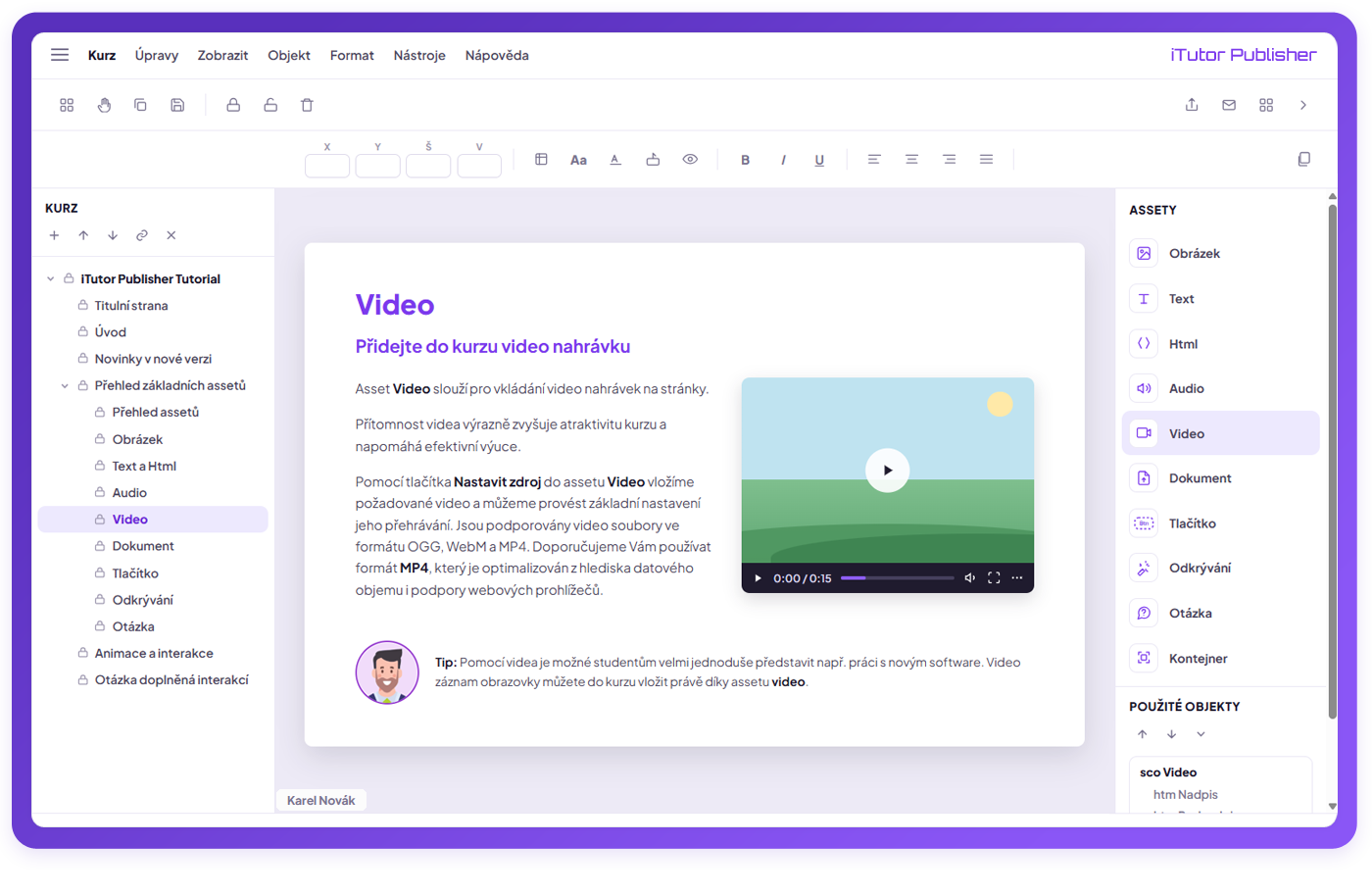
The authoring tool iTutor Publisher brings effortless creation of interactive multimedia e-learning.
Without programming knowledge, it allows you to quickly transform company know-how into modern e-courses. With basic programming knowledge, you can build advanced effects, interactions, and simulations in e-courses.
Thanks to teamwork support, multiple authors can collaborate on an e-course, sharing course pages and learning objects across pages.
AI Generated E-Courses
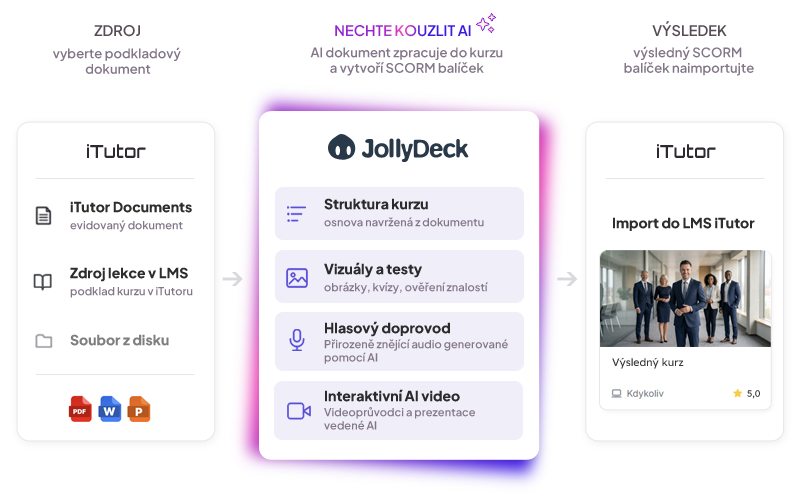
The integrated tool from our partner, JollyDeck Create, enables automated conversion of your PowerPoint, PDF, and Word documents into e-courses using AI.
AI analyzes your document and suggests an editable syllabus. You configure the target audience, depth, source fidelity, terminology, and interaction style.
AI generates the e-course accordingly, which you review, fine-tune in the editor, and easily publish to iTutor LMS.
Ready-to-Use Courses
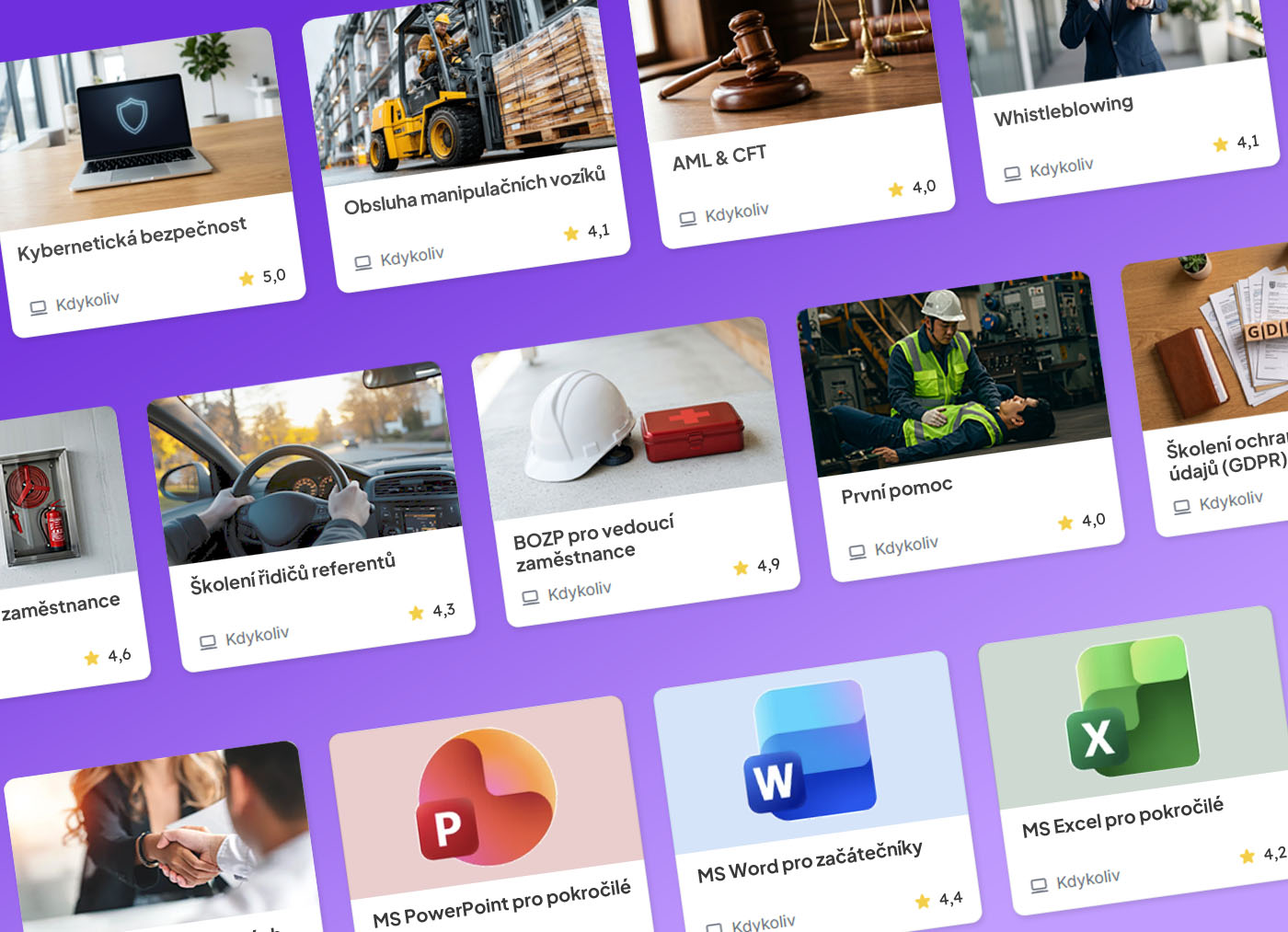
With iTutor LMS, you gain immediate access to an extensive library of professional e-courses.
Acquiring courses from our renowned partners instantly covers mandatory statutory training as well as education for managerial and professional growth.
Our professional e-learning content development team can also develop bespoke, turnkey e-courses for any specific need.
In cooperation with our partner for ready-to-use statutory e-courses in the Czech Republic, CRDR, customers can deploy a complete package of fundamental statutory e-courses immediately upon acquiring iTutor or anytime thereafter. These courses arrive pre-configured in iTutor; when using iTutor Tester, test questions are imported into question banks with pre-built rules, and generated tests are incorporated as lessons into each corresponding course. Simply assign these courses to designated job positions to instantly fulfill corporate statutory training mandates. Furthermore, question banks in iTutor Tester make it easy to generate additional assessments—such as broader testing or quick refresher quizzes between mandatory renewal cycles. The core statutory training package includes:
- Occupational Health and Safety (OHS / BOZP) for employees and managers (initial and refresher training). Covers key workplace safety aspects and common hazards. Available in English, Polish, and Ukrainian. Customizable with profession-specific modules (administration, retail, transportation, schools, healthcare, metalworking, etc.).
- Fire Safety (PO) for employees and managers. Focuses on workplace fire hazards, obligations, preventive measures, and emergency protocols. Available in English, Polish, and Ukrainian.
- Driver Training (fleet vehicles up to 3.5t) for employees driving company or personal vehicles on business trips. Includes comprehensive essentials for fleet drivers, with optional emergency service modules. Available in English and Italian.
- First Aid (lifesaving training) teaching employees how to respond to critical medical emergencies before healthcare personnel arrive. Available in English.
Our partner guarantees ongoing legal consultation, statutory updates, and compliance. The iTutor platform handles course delivery, auditable training verification, training plan tracking, recertification deadlines, certificate issuance, and verifiable electronic signing with eIDAS signatures via iTutor eSignature.
Any SCORM or AICC-compliant statutory courses from third-party vendors can also be imported seamlessly into iTutor.
For statutory training in the Slovak Republic, we provide an equivalent course portfolio in partnership with BEZTECH.
In partnership with CRDR, iTutor offers an extensive library of specialized compliance and recommended training courses, pre-configured with test question banks in iTutor Tester:
- General Data Protection Regulation (GDPR) for handling personal and sensitive data. (Available in English).
- Construction Site Safety for site managers, supervisors, and technical inspectors. (Available in English and Ukrainian).
- Working at Heights covering fall protection, scaffolding, and elevated work platforms. (Available in English, Polish, Ukrainian).
- Warehouse Safety covering racking systems, internal logistics, and material handling. (Available in English, Polish, Ukrainian).
- Forklift (FLT) Operation and powered industrial truck safety.
- Environmental Protection covering air, water, soil protection, and waste management. (Available in English).
- Safe Home Office practices, ergonomics, and productivity. (Available in English).
- Information & Cybersecurity awareness and phishing prevention. (Available in English).
- Safe Use of AI adhering to the EU AI Act, risk mitigation, and ethical standards. (Available in English).
- Chemical Substance & Mixture Handling (CLP/REACH). (Available in English).
- Whistleblowing and corporate compliance protection. (Available in English).
- Anti-Money Laundering & Counter-Terrorist Financing (AML/CFT) for financial and regulated entities. (Available in English).
- Healthcare and Veterinary Clinical Waste Management. (Available in English).
All courses include ongoing legal updates, verified certification, and optional electronic signatures via iTutor eSignature.
Course Catalog
With iTutor Catalog, you build a centralized portal for all your internal and external courses, seminars, and development events.
Automating registrations, approval workflows, and capacity management significantly saves time for HR and managers.
Comprehensive support for training demand and event organization keeps your course offerings up to date and complete.
Attendance tracking and participant evaluations provide complete visibility into attendance and achievement of learning objectives.
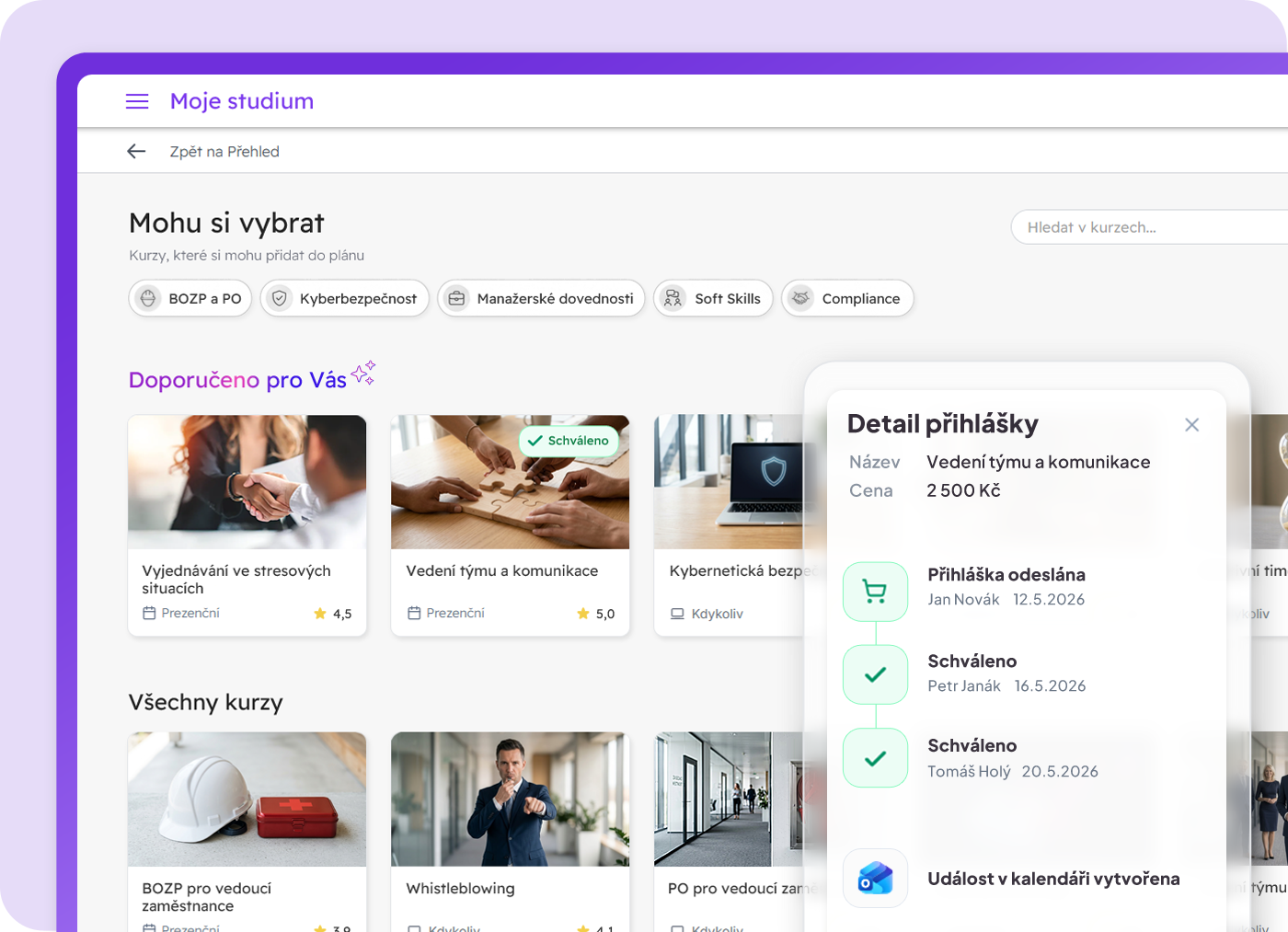
With iTutor Catalog, you can build a central catalog of all training—including e-learning, traditional classroom training, and blended learning. Offerings can be personalized for different user roles; users can browse, search, and register for self-study courses or scheduled sessions, request new courses or dates, or order training directly for themselves and colleagues. Multi-level approval workflows and automated notifications ensure seamless enrollment and immediate access upon approval.
Course Offerings Structure
In iTutor, courses are grouped into Course Areas to create intuitive hierarchical catalogs, similar to categories and subcategories in modern e-commerce portals. Key properties include:
- Name and rich HTML description for engaging presentation.
- Course Area Icons selected from predefined libraries or uploaded via the Icon Editor to match corporate branding.
- Order permissions: Users can submit formal orders for new courses or requested session dates (including team registrations). Upon managerial approval and logistical confirmation, courses and sessions are created and published automatically.
- Request permissions: Users can submit non-binding requests for missing topics or dates, enabling HR to gauge collective demand before scheduling.
- Budgeting settings: Integration with iTutor Budgets for automatic cost center allocation and expense categorization.
- Alphabetical or custom sorting of sub-areas.
- Direct shareable links and inclusion in employee career development plans.
Courses can be linked across multiple areas, supporting parallel organizational views (e.g., categorized by topic like IT or Soft Skills in one view, and by job position like "Sales Training" in another).
Catalog Personalization
Assigning Course Areas or individual courses To Catalog for specific User Groups allows organizations to tailor visibility precisely to target audiences (e.g., sales courses for Sales, technical tracks for Developers). Broadening catalog visibility with elective courses supports succession planning, internal mobility, and employee career development. Configurable approval workflows (No Approval, Group Manager, Course Instructor) ensure financial and resource control.
Comprehensive Training Matrix
While self-study courses can be assigned directly for study, synchronous classroom sessions are published to the catalog for scheduled enrollment. iTutor Catalog unites self-study and classroom education into a single multi-dimensional training matrix with mandatory and elective designations and full budget governance.
iTutor Catalog supports the complete attendance lifecycle—from printable rosters to digital logging and competency awarding.
Attendance Sheets
Pre-configured, fully customizable attendance templates generated via iTutor Reporter. Sheets can be printed for physical signatures or exported to MS Excel. Scanned signed documents can be archived directly with session records.
Attendance Logging
Instructors and HR staff use a dedicated attendance tool to record presence or absence, completing the corresponding Classroom lesson. Supports two operational stages:
- Preparation: Marking arrived participants (including RFID employee card tap-in support) and registering ad-hoc walk-in attendees.
- Final Recording: Bulk or individual presence confirmation, qualitative verbal evaluations, and awarding specific competencies attained during the session.
Also supports ad-hoc individual sessions logged directly by line managers.
Testing
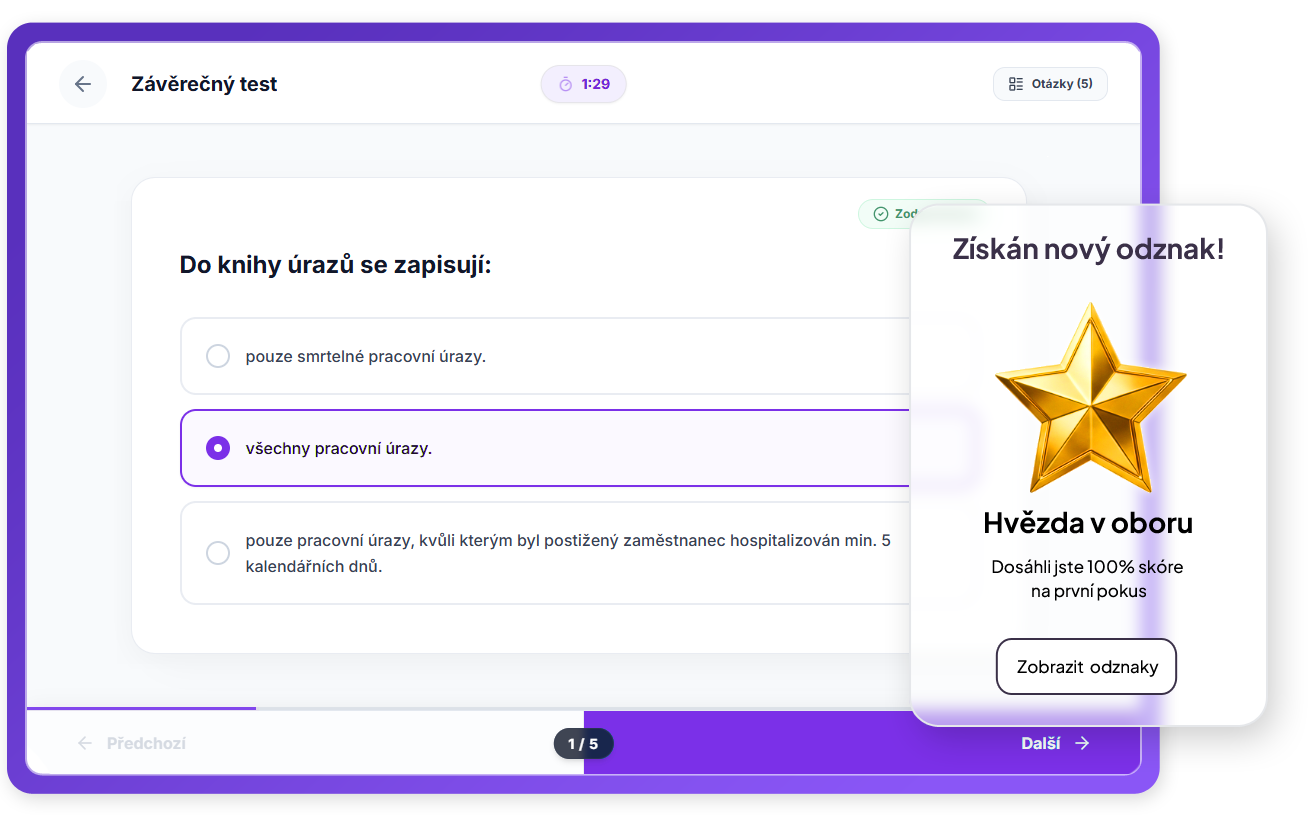
With iTutor Tester, you can create and manage extensive question banks, construct sophisticated tests or questionnaires, and distribute them to users across various channels.
Rich support for diverse question types, complex test generation rules, and extensively configurable exam behavior make iTutor Tester one of the most powerful testing platforms.
Resulting e-tests can be accessed on any device, with support for proctored classroom testing as well as generation and evaluation of printed paper tests.
Finance
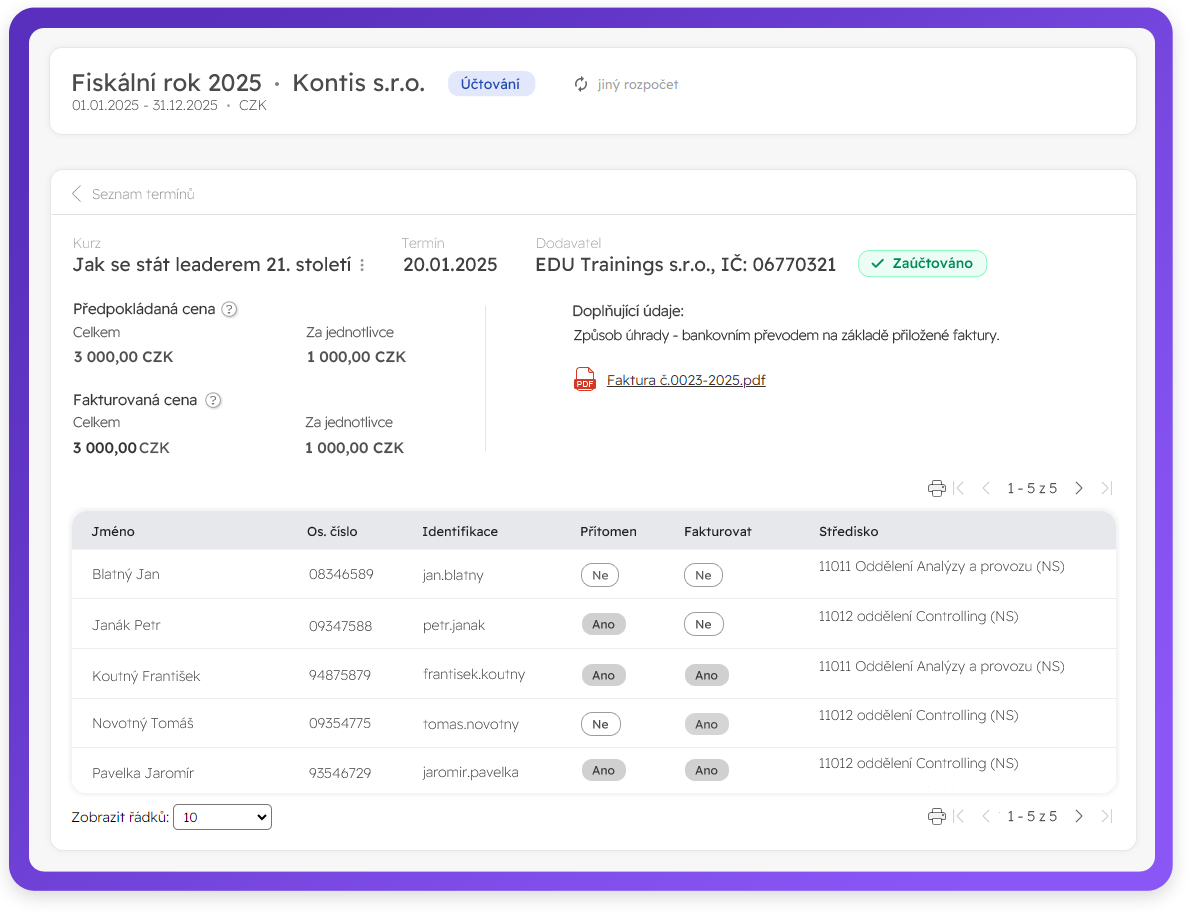
With iTutor Budgets, you gain full control over planning, tracking, and allocating training expenditures.
Model your cost center hierarchy and plan departmental budgets with categorized financial breakdowns.
Account for course sessions and other learning expenses; iTutor Budgets assists registration approvers, monitors budget limits, allocates funds, and tracks invoicing.
Academy
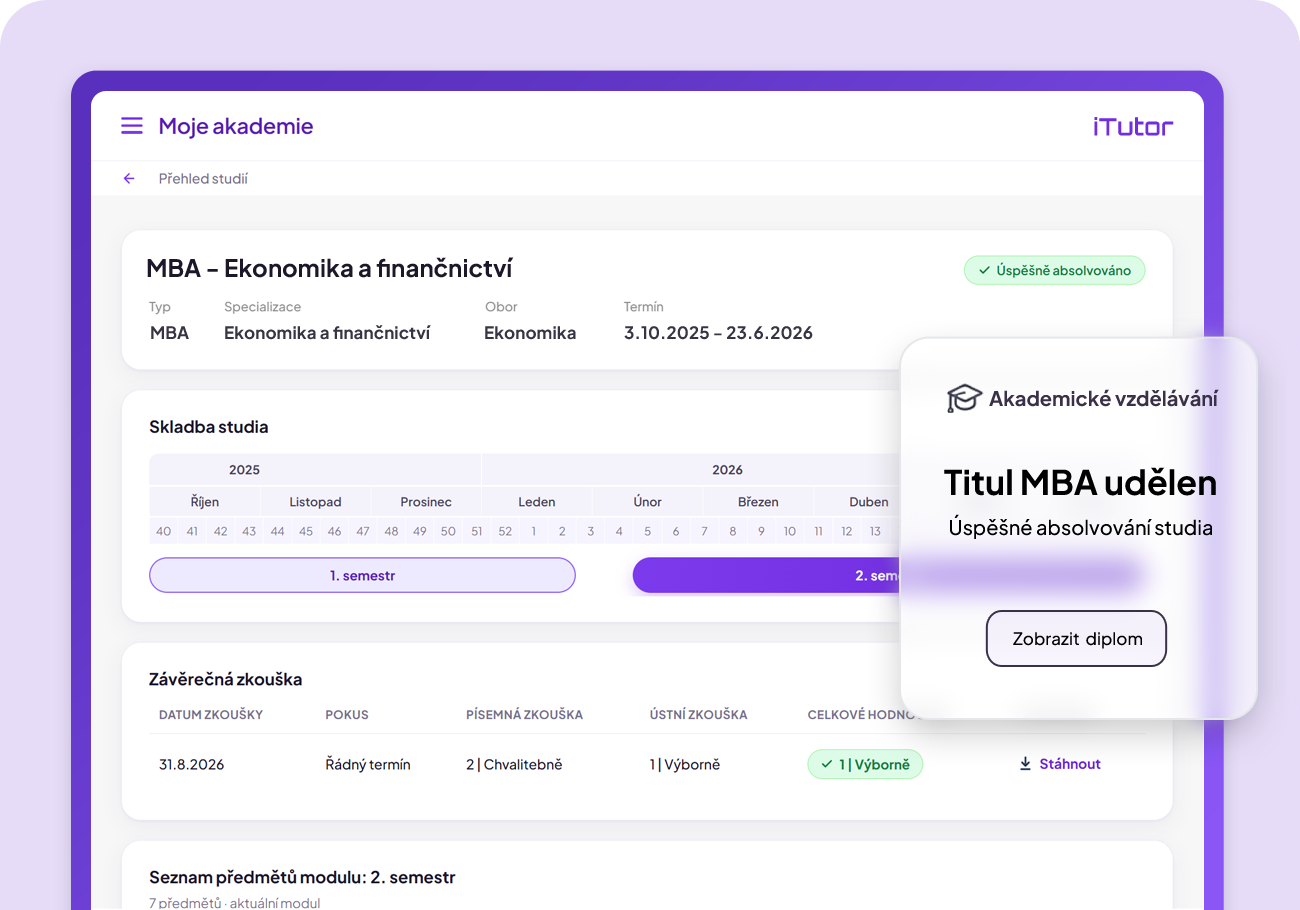
When you need highly qualified, specialized professionals in your domain for whom no standard external curriculum exists, iTutor Academy lets you build your own corporate university offering long-term programs on par with higher education.
The right blend of classroom and distance learning, comprehensive subject management, and multi-tier examinations allow you to cultivate top experts for key roles.
Performance Management
Set goals and measure their fulfillment, record and evaluate qualifications and medical fitness
Goals
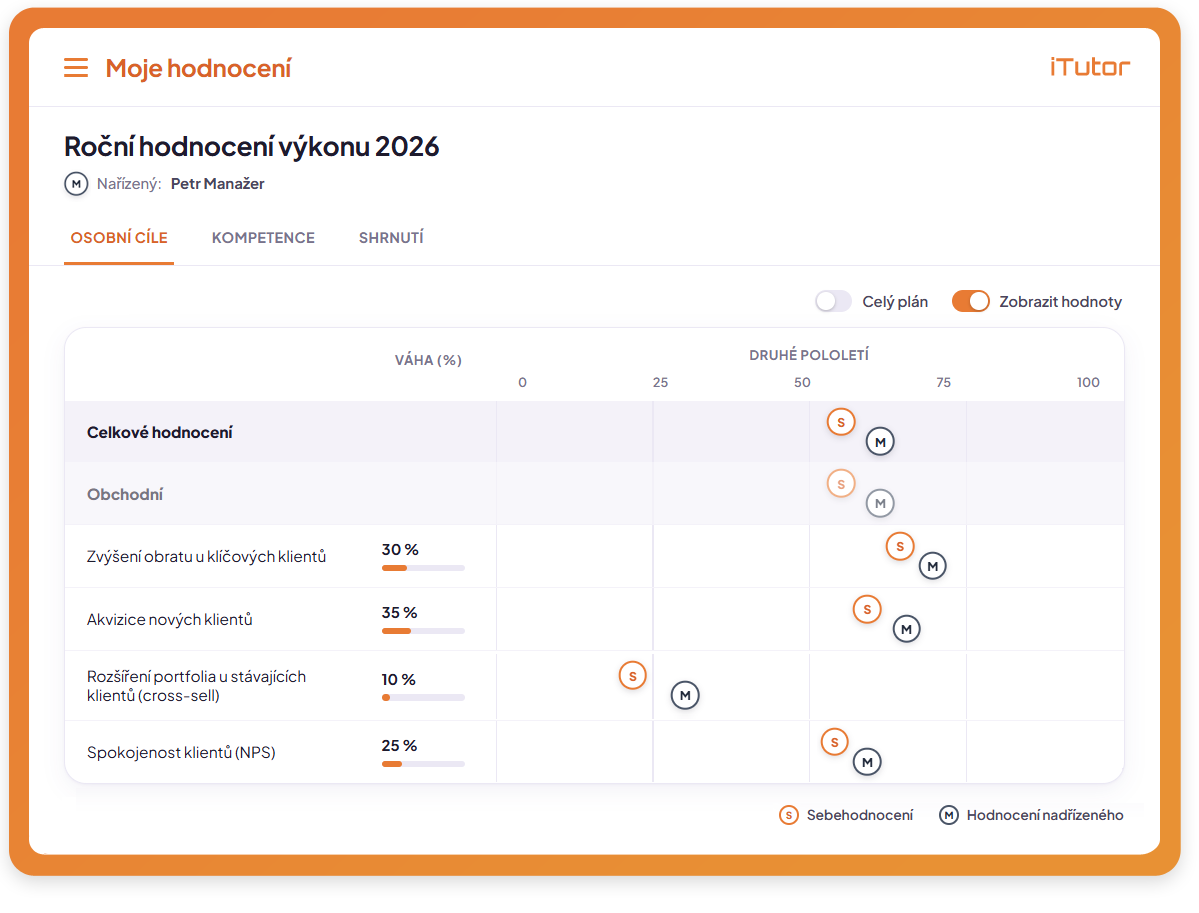
With iTutor MBO, you implement Management by Objectives customized to your business. All team members are aligned and motivated toward achieving current company goals.
Strategic corporate objectives cascade down seamlessly through departments into actionable targets for individual employees.
Ongoing performance tracking by managers and subordinates, with flexible goal updates and adjustments.
Comprehensive final appraisals integrated with competency reviews, compensation, or personal development plans.
Qualifications
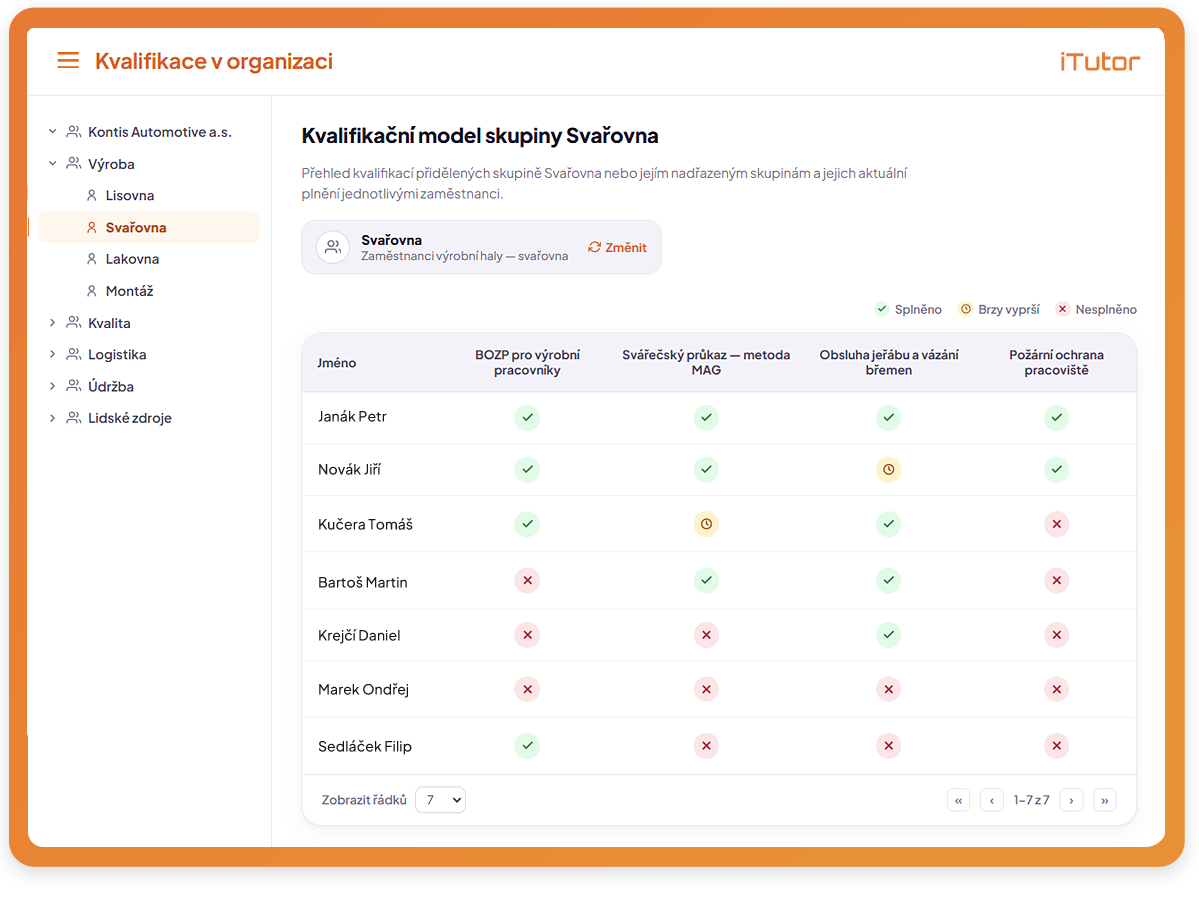
With iTutor Qualifications, you define corporate qualifications and construct a qualification matrix mapping requirements to job roles, workstations, and departments.
Ensure every position is staffed by certified personnel who have completed statutory and internal training, hold necessary medical fitness certificates, external licenses, or academic degrees.
iTutor Qualifications tracks expirations, automates renewals, fosters employee career growth, and helps managers locate qualified specialists across the organization.
Medical Fitness
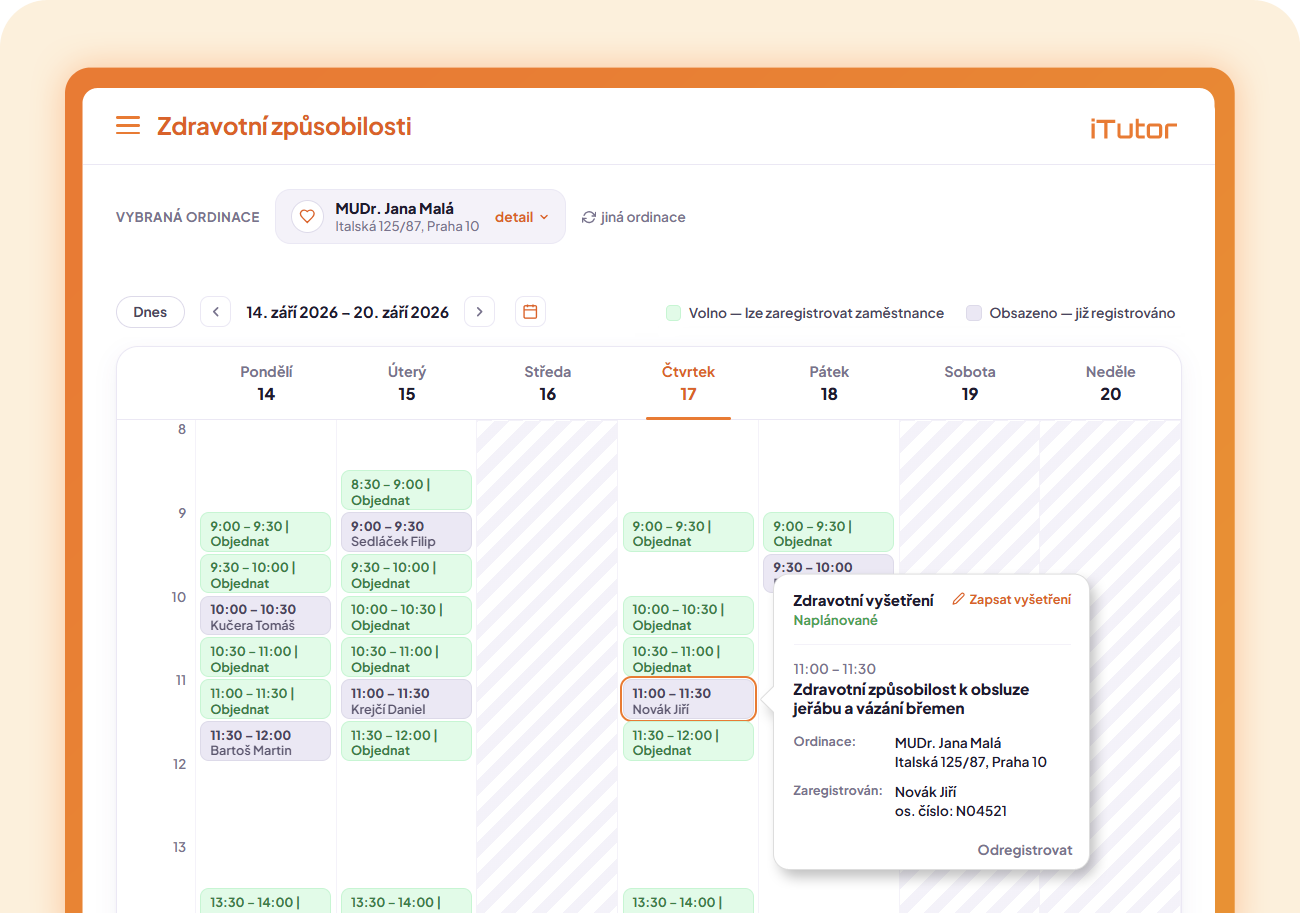
With iTutor Medical Fitness, you manage occupational health records according to statutory hazard categories and coordinate occupational health checkups.
iTutor Medical Fitness manages partner clinics, oversees the workflow from appointment booking & examination to medical report issuance & fitness certification, and automates periodic renewals.
Comprehensive tracking of medical checkups, health reports, and fitness records, backed by notifications, centralized calendar scheduling, and clinic management, guarantees complete legal compliance.

In employment relationships, great emphasis is placed on employee health and safety, which is why Occupational Health Services (OHS/PLS) carry significant weight. It is not just a formal obligation, but a comprehensive system impacting the prevention of accidents and occupational diseases.
Read more
9 min read
Talent Management
Define your corporate competency model and gain new perspectives on competencies through 360° feedback
Competencies
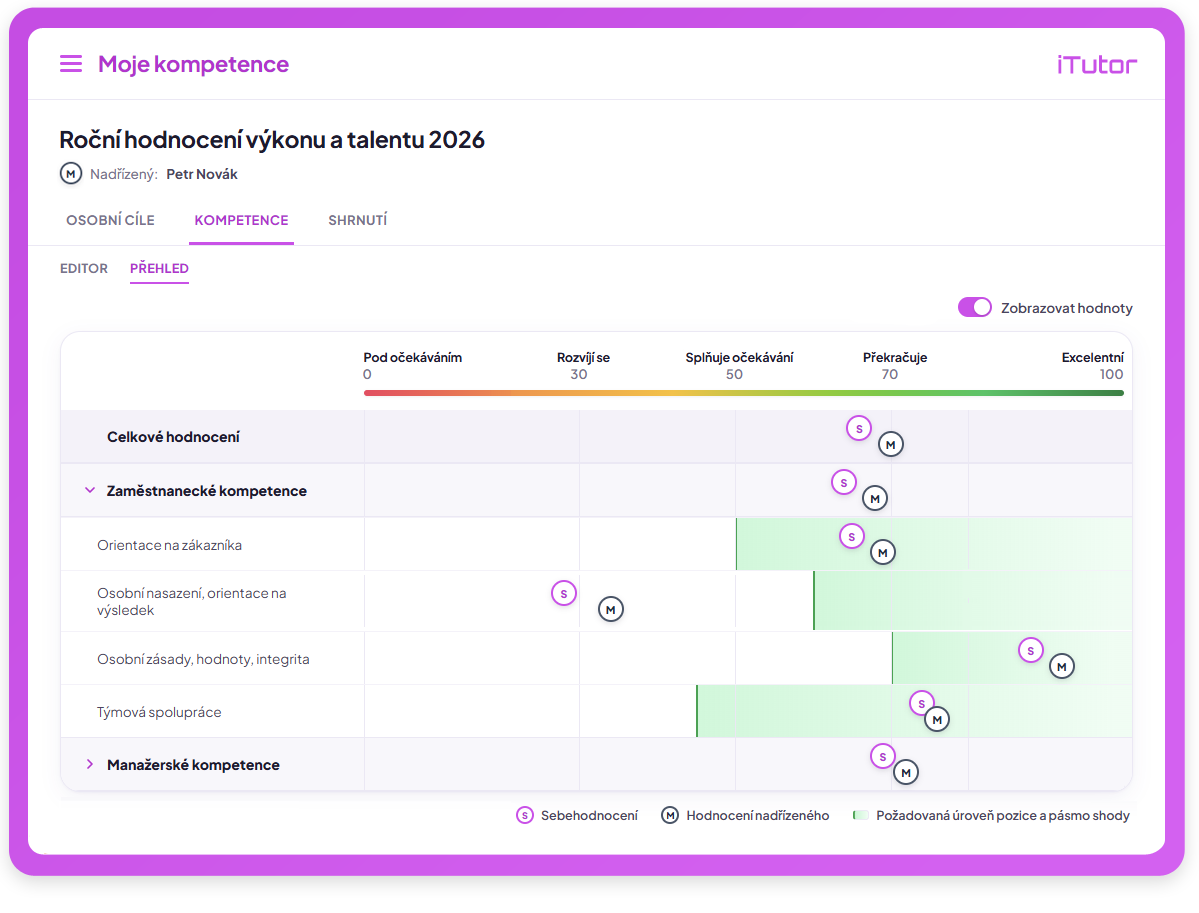
With iTutor Competencies, you define the competencies required to execute business tasks and achieve company objectives, build a competency model mapping skills to roles, and maintain complete control over the competency evaluation process.
iTutor Competencies oversees review milestones, helps create individual employee development plans, and delivers clear Gap analyses uncovering organizational skill gaps.
360° Feedback
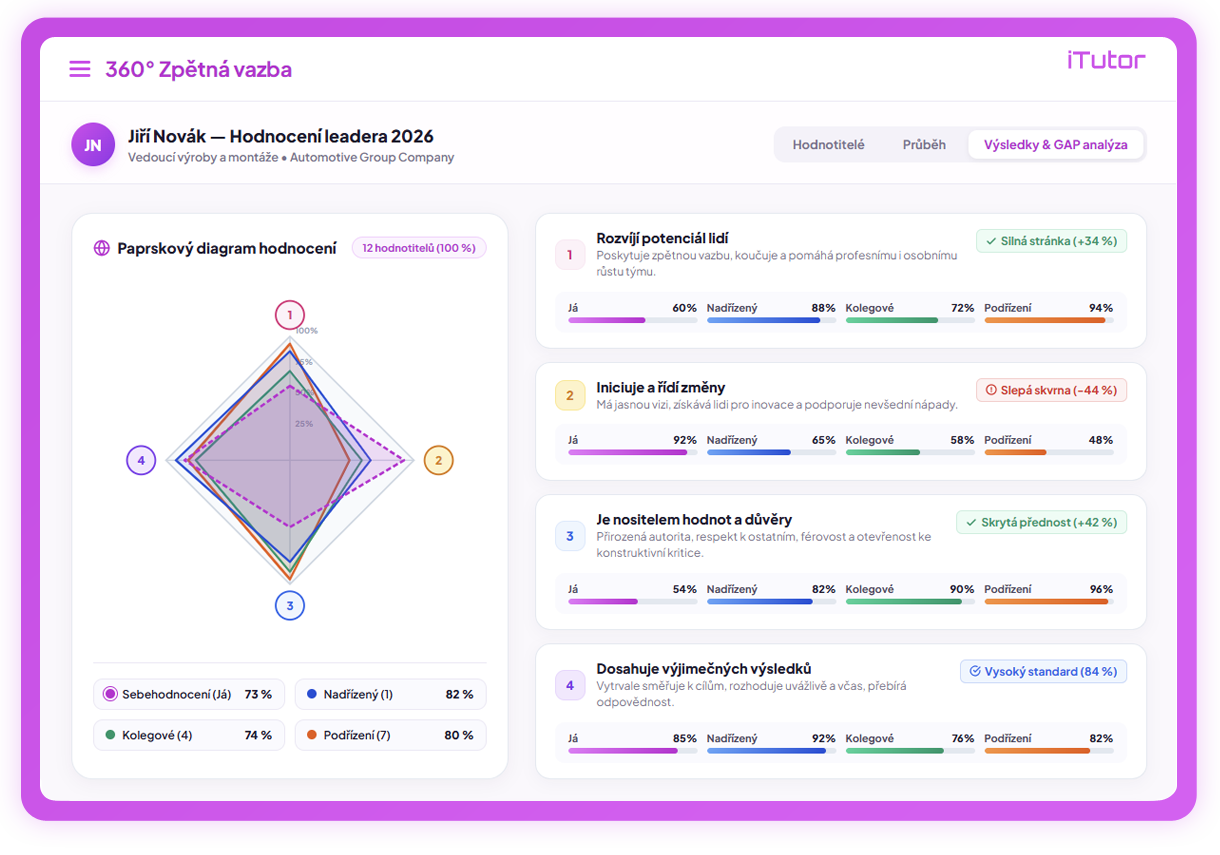
iTutor 360° Feedback empowers employees to receive a multidimensional, comprehensive, and anonymous perspective on how their workplace circle perceives their competencies.
In iTutor Competencies, mandatory competencies are evaluated in formal 180° reviews for performance improvement, goal achievement, and compensation benchmarking.
iTutor 360° Feedback can leverage existing corporate competencies or define new ones, giving selected employee cohorts a rich panoramic view of external perception, blind spots, and development opportunities.
Collaboration
Manage company documents, sign them electronically, and collaborate using AI
Documents
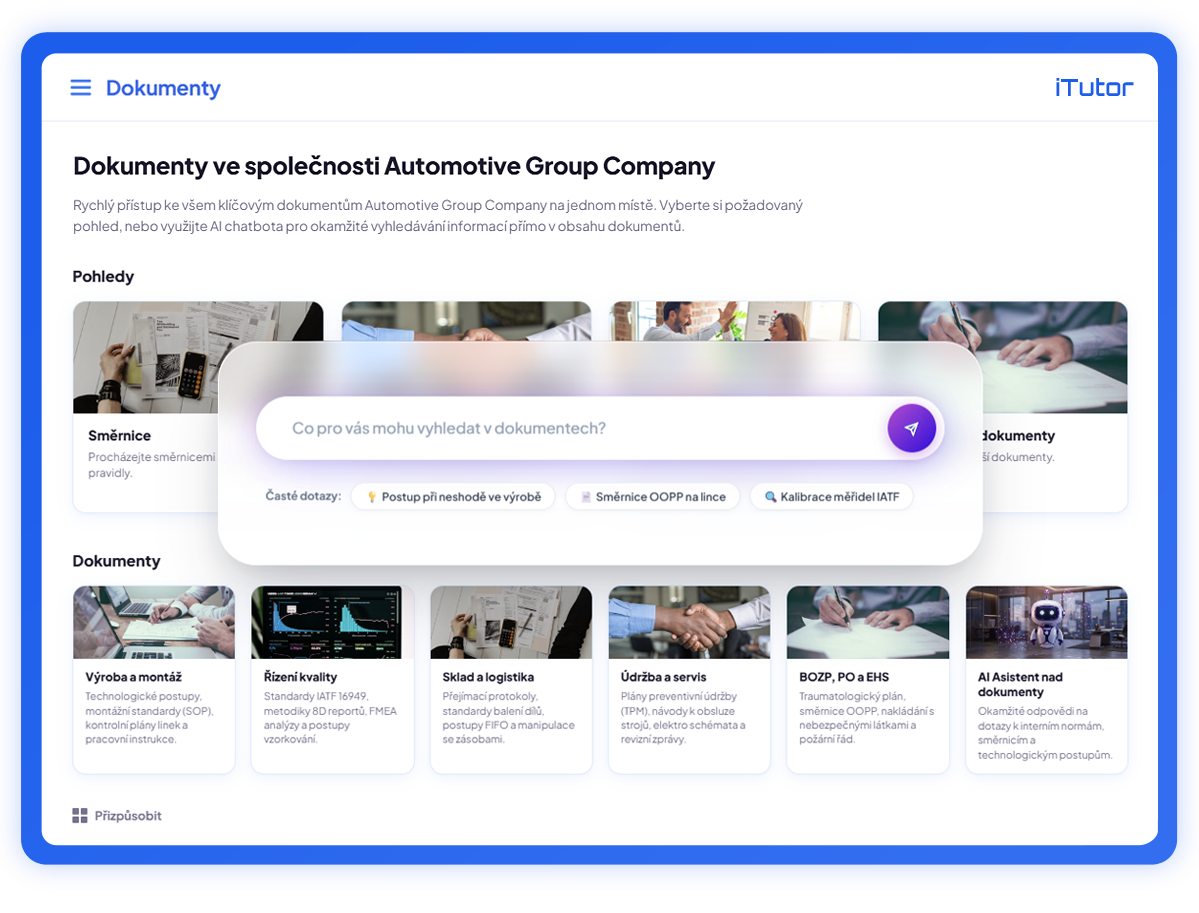
iTutor Documents is a powerful DMS (Document Management System) for managing learning assets as well as all other corporate documentation.
Tight integration with other platform modules delivers features rarely found in traditional DMS solutions—such as reading confirmation tracking, periodic renewal mandates, comprehension testing, and AI-driven e-course generation from documents.
Access control, approval workflows, versioning, metadata tagging, full-text search, and a host of other capabilities make iTutor Documents the central repository of company know-how.
AI
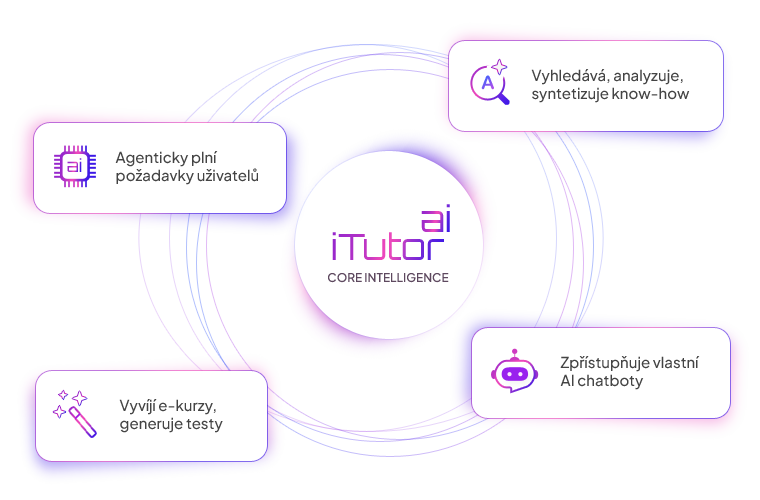
iTutor AI embeds advanced artificial intelligence across all iTutor platform modules.
It facilitates Just-in-Time and micro-learning for students, assists users with platform navigation, and analyzes, synthesizes, and executes user tasks.
The iTutor AI Assistant formulates execution plans, breaks complex requests into discrete steps, and leverages Tools to access both static know-how and live corporate data across iTutor and connected external systems via the iTutor AI API.
A significant portion of e-course knowledge is wrapped inside interactive instructional design strategies—progressive disclosure, click-to-reveal objects, interactive quizzes, animations, and simulations. These elements enhance learner engagement but remain opaque to standard AI scrapers until complex user interactions occur.
iTutor Publisher, in tandem with iTutor AI, generates semantic textual representations of interactive multimedia courses. It extracts both visible text and interactive logic into an AI-friendly format, unlocking previously hidden knowledge for the Agentic RAG architecture implemented in iTutor.
Learning content in iTutor resides in e-courses and documentation within iTutor Documents. The iTutor AI Assistant synthesizes extensive learning materials into actionable, bite-sized summaries—delivering Just-in-Time learning and micro-learning precisely when an employee tackles a specific work assignment.
JIT combined with micro-learning yields substantially higher knowledge retention and productivity than traditional training conducted in isolated blocks.
Through Agentic RAG, iTutor AI seamlessly unites stable organizational knowledge with real-time operational data.
Static know-how (guidelines, standard operating procedures, contracts, manufacturing documentation) is vectorized into embeddings for semantic search. Concurrently, dynamic live data (current course session schedules, seat vacancies, learner progress) is accessed through Tools. The AI Assistant autonomously plans execution steps, fetches live and static context, and answers inquiries or executes complex actions (e.g., locating relevant courses and presenting immediate open session registration links).
iTutor AI applies Security by Design across all vector knowledge and execution tools. Context retrieved from vector databases is filtered strictly against the authenticated user's access rights before being injected into the LLM prompt.
For Agentic RAG tools, iTutor AI implements RBAC for Tools: if an employee lacks permission to execute a tool, the LLM is never exposed to its specification, providing robust defense against prompt injection and unauthorized actions. For sensitive data-altering operations, Human-in-the-Loop ensures the AI prepares the action for explicit user confirmation rather than executing autonomously.
Most AI initiatives struggle because knowledge is fragmented across LMS, SharePoint, ERP, CRM, and communication tools. iTutor AI provides ready-made connectors mirroring assets from SAP, MS SharePoint, Jira, Salesforce, and SQL databases into its unified vector store.
External systems can be queried seamlessly using native SSO and identity protocols (Active Directory, SAML 2.0, WS-Federation, MS Entra ID, Okta). This integration layer dramatically reduces AI deployment costs by eliminating complex data migration projects.
An automated know-how change agent continuously monitors internal documents, e-courses, and external repositories for modifications. Detected updates are routed to the iTutor RAG creator, which automatically regenerates embeddings in the vector knowledge base, keeping the AI assistant up to date with zero manual overhead.
iTutor AI enables rapid creation of standalone AI Chatbots deployable to intranet portals or public websites. Simply define a virtual user in the organizational hierarchy to set data access boundaries, configure LLM parameters, tone, and behavioral instructions, and copy a lightweight embed snippet.
Administrators can monitor conversations, fine-tune source knowledge bases, and utilize the iTutor AI API for bespoke conversational UIs, speech synthesis, or animated avatars.
Platform iTutor with iTutor AI delivers an immediately operational, production-tested AI environment. By activating the module, organizations immediately tap into vector RAG and Agentic tools over existing documents and e-courses, avoiding multi-month engineering cycles and infrastructure costs.
The article summarizes AI use in e-learning and describes practical implementations in iTutor.
Read more
8 min read

Practical approaches for implementing AI across organizations while safeguarding company know-how and sensitive data.
Read more
45 min read
eSignatures
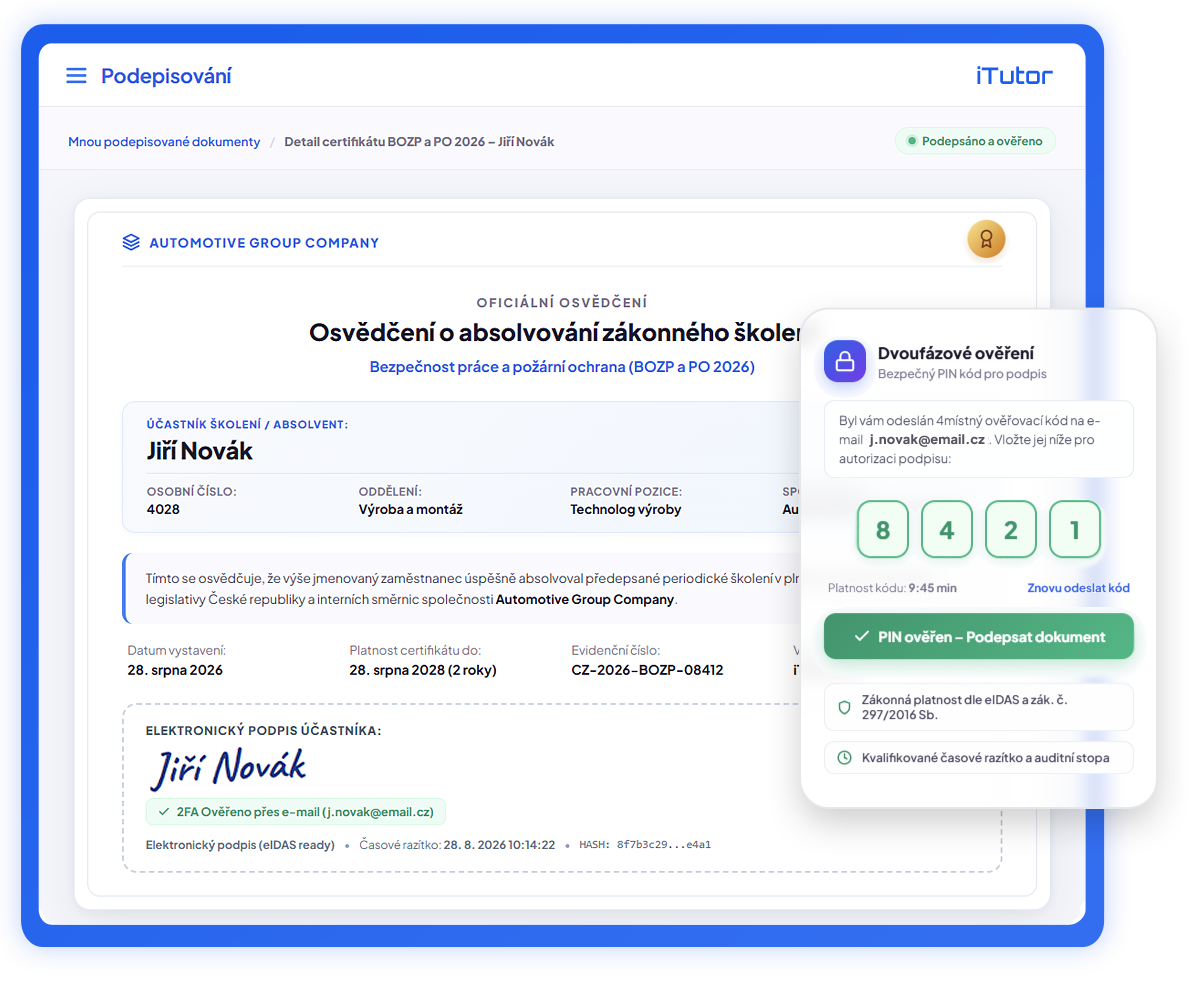
With iTutor eSignature, you electronically sign any certificate and document within the iTutor platform in accordance with the European eIDAS framework.
Automated electronic signing of certificates and training records issued upon course completion in iTutor LMS, alongside preparation, distribution, signing, and archival of any document across iTutor.
Support for all eIDAS signature levels—from Simple Electronic Signatures to Qualified Electronic Signatures.

What electronic and digital signatures are and how e-signature technologies are applied in e-learning and compliance.
Read more
6 min read







Implementation & Technology Integration of the iTutor Platform
Connect iTutor with your existing HR, ERP, and identity systems. Run in the cloud or on your own infrastructure with support from seasoned specialists.

2.0


API

Operating Model & Flexibility
Ecosystem Integration
Open Architecture & HRM/ERP
Comprehensive Solutions & Partnership
“We don't just deliver another piece of software to your company; we deliver solutions and services that empower your ability to succeed in your business.”
We will prepare an architecture and integration blueprint tailored specifically to your IT infrastructure.